Friday, 22 January 2016

NAIJA LATE 90s FORGOTTEN PRODUCTS

Some products made in those days have been forgotten and children nowadays have no clues about them at all. Believe me, there are some of them here.

Do you remember these stuff in those days? It is memorable. Right? Oxford maths set is one of them. I used it then. Those days had gone...
Posted by Jvtech Solutions on Friday, January 22, 2016

Tuesday, 5 January 2016

FREE PC MAINTENANCE FOR KASU STUDENTS AND STAFF


Kaspersky Internet Security 2016 and laptop maintenance for KASU staff and student are designed to minimize the cost of IT products and services annually. Imagine you have documents and files and virus corrupts them as you transfer them to external devices. Imagine paying twice or thrice in a year for formatting. Imagine your laptop repeatedly popping up activate windows non genuine windows and blank dark wallpaper. Imagine upgrading your laptop windows to Windows 10 free of charge? Our services ensure that you get 1 year premium Kaspersky, free formatting and reformatting, free softwares installation and your windows are genuinely activated once you register your laptop with us. 
Registered staff or students benefit:
Kaspersky Intrernet Security 2016 price in Nigeria1.                1 year + Kaspersky Internet Security license activation worth (#3,000)
2.                Free backing up and free formatting if it is needed within the duration of a year worth (#1,500)
3.                Free installation of internet browsers, Encanta, Activated Internet Download Manager, Microsoft Word 2016, Oxford Advanced Learner Dictionary, Cambridge Advanced Learner Dictionary PDF, Corel Draw, Photoshop, Picasa, Marvins Bacon, Minitab and SPSS which worth (#3,500)
4.                Free activation of non-genuine windows if it is needed worth (#500)
Each registered staff or student for these services will benefit this 4in1 offer on their registered laptop (January till October 1st 2016) free of charge. 
Other benefits for those that register their laptops are:
>>>Free modem internet profile configuration
>>>Free 10 latest movies out of 50 movies +. Click here to see the list of the movies.
>>>Free windows 10 upgrading for first 20 registered members who pre-register in our registration book. The worth of Windows 10 upgrade is #1,500 but it is free of charge to first 20 4in1 registered KASU students and staff.

Registration for these services per laptop is #2,000 from now till October 1st 2016. No charges for re-formatting, No purchasing of 1 year premium Kaspersky license key, no payment for windows activation and no payment for aforementioned software installation. Registered staff and student can save more than #6,500 for a period of one year.

Our office: MUFNAJ Global (KASU Market) Fridays and Saturdays you can meet us. You can  contact us via whatsapp 08188333029 for more info or call us 08102541756.
MAKING IT AFFORDABLE FOR ALL

Monday, 4 January 2016

15 Thrilling Movies We Can’t Wait to Watch in 2016

Have you played angry birds  game on your android? Angry birds movie is one of the 2016 unreleased top movies. This is another anticipating thrilling movies that we are eager to watch this year. Early this year, most of them will be premiere at cinema and soon you will be able to download and watch them on your laptop. I will send you the links on my blog where you can download them as they are released. These are to-be-released 2016 movies:
1. Captain America Civil War

Captain America Civil War


 2. Deadpool

Deadpool 


 3. X-Men: Apocalypse


X-Men: APocalypse


4. Batman vs Superman
Batman vs Superman 


 5. Independence Day: Resurgence
Independence Day: Resurgence


6. Teenage Mutant Ninja Turtles 2
Teenage Mutant Ninja Turtles 2 


7. Suicide Squad                                
Suicide Squad 


8. Warcraft
                                 
Warcraft


9. Star Trek Beyond
Star Trek Beyond


10. Fantastic Beasts Where to Find Them
Fantastic Beasts Where to Find Them


11. The Legend of Tarzan

The Legend of Tarzan


12. Gods of Egypt

Gods of Egypt


13. Kung Fu Panda 3

Kung Fu Panda 3


 14.  Iron Sky
Iron Sky


15. Angry Birds
Angry Birds


I will keep you posted on how you can download them as they are released on my blog. Click here to see the list of latest movies I will download on JVTECH 4in1 PC maintenance registered students and staff free of charge. Click here to see the amazing unbelievable benefits that those who register their laptops with us.


Sunday, 3 January 2016

Top Two Ways of Facebook Hacking and How You Can Protect Yourself

Facebook is one of the most popular social networking websites on the internet. Facebook has more than a billion users, so Facebook is a favourite target of hackers.
 Hackers use various methods for hacking a facebook account password of victim. Here I tell you what type of methods hackers are using for hacking a Facebook account and how can you prevent yourself from these hacks.
1. Facebook Phishing

Phishing is one of the most popular ways for hacking a Facebook account. In Phishing, the hacker creates a fake login page or create a clone of facebook login page that looks like the real facebook page. In the next step facebook, hacker asks the victim to log in through the fake phishing web page, victim username and password stored in a hacker computer.

How to Protect yourself from Facebook Phishing

  • Never login your facebook account on another computer.
  • Always avoid emails that ask you to log in your facebook account in the new tab.
  • Never open any spammy links that give by your friend in the message box or by SMS.
  • Always use Chrome browser, chrome identifies the phishing page.
  • Use Antivirus (Recommendable Kaspersky Internet Security 2016) in your computer.
  • Make sure you are on facebook.com and double-check the web address.
2. Keylogging
Keylogging is one of the easiest ways to hack a password of the facebook account. Avast free and some other weak Antivirus will not detect the attack.
Keylogging

Keylogger is a small software or program which installed in a victim computer and this program record everything which victim type in his computer.


How to Protect yourself from Keyloggers

  • Install a good antivirus(Recommendable Kaspersky Internet Security 2016) in your computer.
  • Never open your facebook account on another computer.
  • Always download free software from trusted websites.
  • Never download or get a software from untrusted sources.
  • Always scan a pen drive for virus.
Kaspersky Internet Security has features that can protect you from being hacked. I have been attacked countless times but continuously three times check the picture of how Kaspersky protected my facebook account and my laptop from being hacked. 

Kaspersky Network Attack
1 year license kaspersky Internet Security is #2,800 in most TECH stores as at this post but JVTECH 4in1 PC maintenance registered students and staff will get it installed free of charge on their laptops. Click here to read how to register for the offer so that you can protect yourself from hacking attack.
In my next post, I will share more ways hackers can hack your account without Premium Antivirus.

Monday, 28 December 2015

How to Connect Your Android Smartphone To PC/Laptop Without USB Data Cable To Transfer Files

We all usually use USB Data Cable to connect our samrtphone with PC/laptop. And you will say it is the only way to connect smartphone to PC/laptop without using data. But for android smartphones their are several apps available in market which will help you to do this task without any data loss. In this tutorial I am using similar kind of app named Xender. I think it more reliable and have a clean , simple user interface than any other app. And in Xender you can connect your android smartphone to pc/laptop with or without using data[that’s up to you]. And also you can connect your android smartphone with an iphone to transfer files.So lets start:
Step 1

First you have to download latest version of Xender.So click the below link to download Xender.

Step 2

Now Install Xender in your android smartphone and then open the app.
Xender

►Step 3

Yes this is the home page of Xender.
Now you can see a Toggle Bar top of the UI.
Tap it to connect your phone it with pc/laptop.
 home page of Xender

►Step 4

In the next page you can see two options one is connect with using data and another without data.
If you choose to connect with using data:
Goto “http://web.xender.com” and scan the QR Code
connect using data

►Step 5


If you like to connect without using data tap on the RED Icon in right side.
 connect without using data
***Note: If your mobile data is off you will see a page like below image when you tap Toggle Bar.

►Step 6


Now turn on your pc/laptop and Switch on your WiFi.And search for available networks.Their you can see “Xender_AP7474” or something similar.Connect to it.
give permission for connecting to you pc/laptop
Switch on your WiFi.

►Step 7


Now open your browser and enter the url “http://192.168.43.1:33455“.
You can see a page similar to below images in both browser and phone.
So tap on “Accept” to the message in phone to give permission for connecting to you pc/laptop.

►Step 8


Yes you successfully connect your android smartphone with your pc/laptop.
successfully connect your android smartphone with your pc/laptop

►Step 9


To transfer files just drag and drop it to respective category.
Like if you want to transfer image files,just select them amd drag it over to image category.
 drag and drop it to respective category.
 drag and drop it to respective category.
 drag and drop it to respective category.

►Step 10


If you like to transfer files to you pc/laptop from phone just hover over the respective file then you can see a download button click on it.Don’t worry it will not use your data to download those files.
hover over the respective file then you can see a download button click on it
And if you want to transfer multiple files,first select the files then click download button on top left corner.
transfer multiple files,first select the files then click download button on top left corner.

►Step 11


To disconnect click “Disconnect” button in you phone or “Logout” button on top right corner.
Disconnect button in you phone or Logout button on top right corner
I hope you like this tutorial. However, Xender is most trusted app to transfer images, videos, documents, APKs and all other any type of files in fast, easy and secure way.
And if you are facing any problem while trying to connect your android smartphone to PC/Laptop with above method feel free to contact me via Whatsapp: 08188333029.
You may share the tutorial with your friends and let them know the trick too.

courtesy: Sabarinath

Sunday, 27 December 2015

How to Detect Virus in Your Laptop Easily

How Can You Know if Your Laptop or Computer is Infected with Virus?
There are different means you can diagnose virus in your laptop.
The Use of Premium Antivirus and The Symptoms of Virus Infection
I won't talk much on the use of premium antivirus. I will only recommend the one I have been using over 5 years that have saved me several documents and files. When I used my flash and it became infected, Kaspersky is the number 1 recommendable antivirus I ever used. The only reason people don't use it because it is expensive but don't worry I have made it cheap to the point that you can afford it so that your files will be safe and your hard-disk and your laptop hardware too. You can contact us and get it installed free of charge as registered member
. 
The symptoms you can look for in your laptop are:
1. Check your local disk icon if it has changed to folder icon. I hope you know the difference between folder icon and hard disk icon. If it has changed to folder icon, it is infected with virus. It is likely paint.exe virus.

2. If you insert flash or removable device in your laptop and all the documents on it are converted to shortcuts. Your laptop is infected with virus. It is likely vbs virus Excel.Wsf virus.

3. Another one is when you insert removable device in your laptop and all your files on it are hidden in a shortcut icon which rename it to the size of the removable device.

4. If your system is having high processor and ram but it is slow when you are operating, it is probably your laptop is infected with virus.
 
You contact us via Whatsapp 08188333028 for more info or call us 08102541756. Click here to see how to register for this JVTECH 4in1 PC maintenance offer.

MAKING IT AFFORDABLE FOR ALL

Kaspersky Premium Vs Avast Free

I would like to write about the features of these Anti-Viruses but I will just hint you and the pictures will describe their features. Any setup antivirus that get installed on a laptop that has installed antivirus without many you that there is already installed on there, is not real and reliable antivirus. Kaspersky will warn you to remove Avast before it can install.
Your internet banking is safe with Kaspersky and not with Avast.
Anti-Spam and Anti-banner which block porn banners are enabled with Kaspersky and not with Avast.
Kaspersky is ranked 2nd in the world while Avast free is not in the list except Avast  Pro is ranked 11 out of 15 Antivirus softwares in the world. Click here to see the details of the ranking.
Check the pictures to see their different features.
Kaspersky features
Avast features
From the differences above, you will see the reasons virus like vbs that creates shortcut on files and folders in flash despite installed Avast on the laptop. Smadav is more of malware scanner and not Antivirus or Internet Security. It is not every dog you can keep to secure your house from intruders likewise installing premium Internet Security with license like Kaspersky is valuable and reliable than installing free Antivirus that keeps your laptop vulnerable and insecure from virus and hackers.
You contact us via Whatsapp 08188333029 for more info or call us 08102541756. Click here to see how to register for this JVTECH 4in1 PC maintenance offer.
MAKING IT AFFORDABLE FOR ALL

Must-Have Software


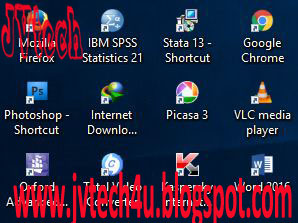
Every laptop will be useless without software installed on it. As a laptop user, you need some essential software to run and to carry out crucial tasks either you are staff or student. I have designed a service for laptop users that will receive free of charge installation of the following software:
1.Adobe Reader 
2. Total Video Converter
3. Internet Browsers (FireFox, Chrome etc.) 
4. Internet Download Manager 
5. Microsoft Full Packages 2016 (Word, Powerpoint, Excel, Access etc.) 
6. Photoshop 
7. Encarta 
8. IBM SPSS Statistics 
9. VLC media player 
10. Picasa 
11. Oxford Advanced Learner Dictionary 
12. Cambridge Advanced Learner Dictionary 
13. Corel Draw 12
The above software are all licensed and will be installed on your laptop free of charge once you register your laptop with us. Click here to read how to register your laptop with us or contact us on Whatsapp: 08188333029 or call on 08102541756. You may like our Facebook page here